HTMX Part 1: HDD Philosophy & Hello World 🚀

Mentor's Note: The modern web has gotten incredibly complex. We build APIs in one language, compile massive JavaScript bundles for the frontend, and spend days debugging state synchronization. HTMX asks a simple question: What if HTML itself was powerful enough to handle dynamic updates? Let's find out! 💡
🌟 The Scenario: The Over-Engineered Food Delivery App 🍔
Imagine you want to start a local food delivery service in Surat.
- The Modern Way (SPA): You hire a developer who spends 2 weeks setting up a React frontend, a Redux state store, Webpack/Vite compilers, and a Node.js REST API. You ship 2MB of JavaScript to a student's phone just so they can click "Add to Cart" and see a number increment.
- The Hypermedia Way (HTMX): You write a standard HTML page. When the student clicks "Add to Cart", the server returns a tiny snippet of updated HTML (
<span id="cart-count">1</span>), which replaces the old count instantly. No compilers, no state stores, no frontend frameworks.
Which one is faster to build, easier to maintain, and runs better on a low-end phone? That's the power of Hypermedia-Driven Development (HDD).
📖 Concept Explanation: What is HDD?
What is Hypermedia-Driven Development?
Hypermedia-Driven Development (HDD) is an architectural style where the application state and transitions are defined entirely through hypermedia (like HTML) rather than external client-side scripting and JSON APIs.
Under the hood, HTMX extends HTML by allowing any element (not just <a> and <form>) to make HTTP requests, using any HTTP verb (not just GET and POST), triggered by any browser event, and swapping the response directly into any part of the DOM.
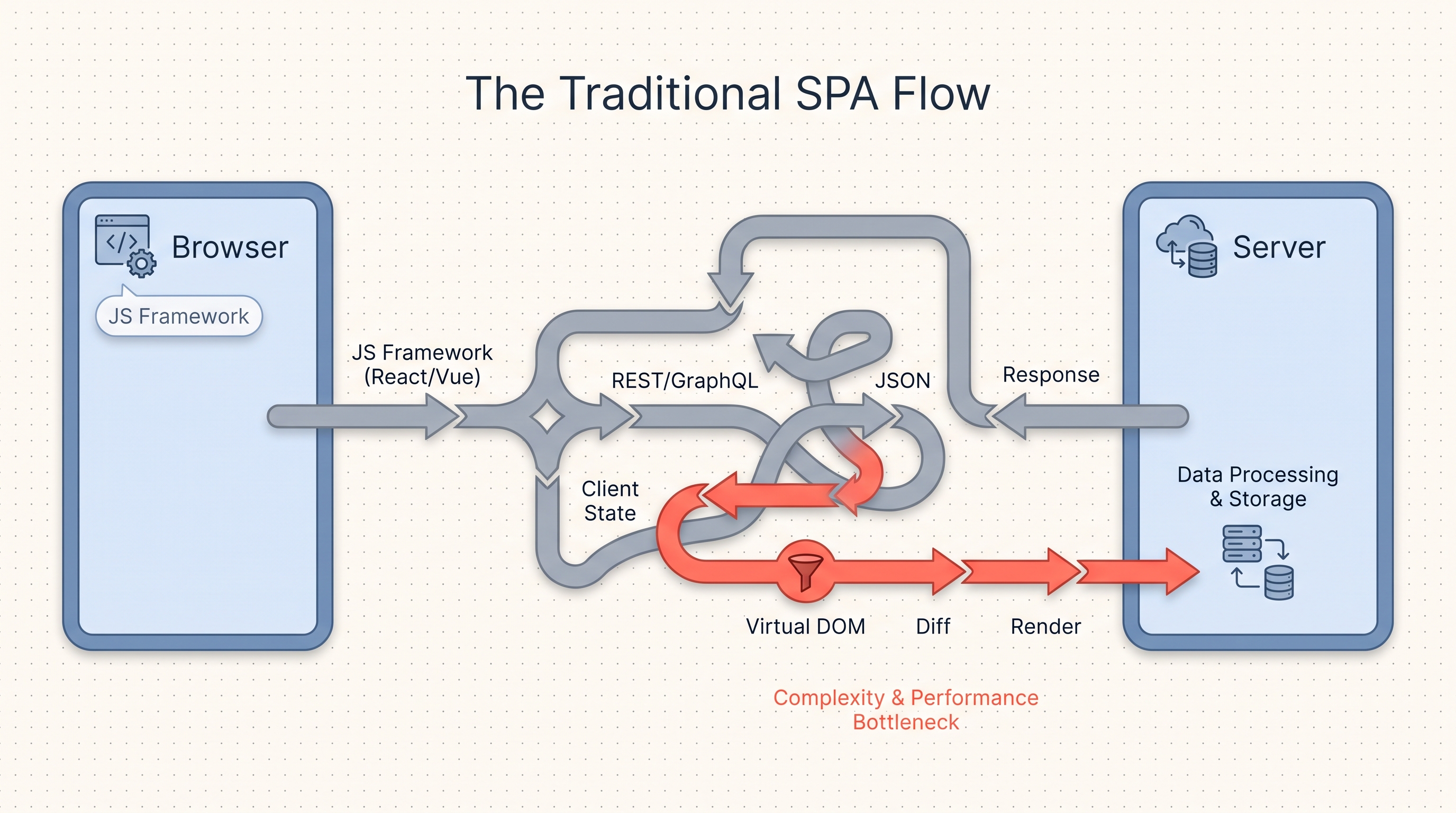
Traditional SPA vs. HTMX Data Flow
Let's look at how data flows between the browser and server in a traditional Single Page Application (SPA) versus an HTMX hypermedia application:
1. The Traditional SPA Flow
In a traditional SPA, the browser loads a large JavaScript bundle (like React or Vue). To render any data, it must make API requests to get JSON data, parse it, update the local client state, run Virtual DOM diffing, and then render it to the page.
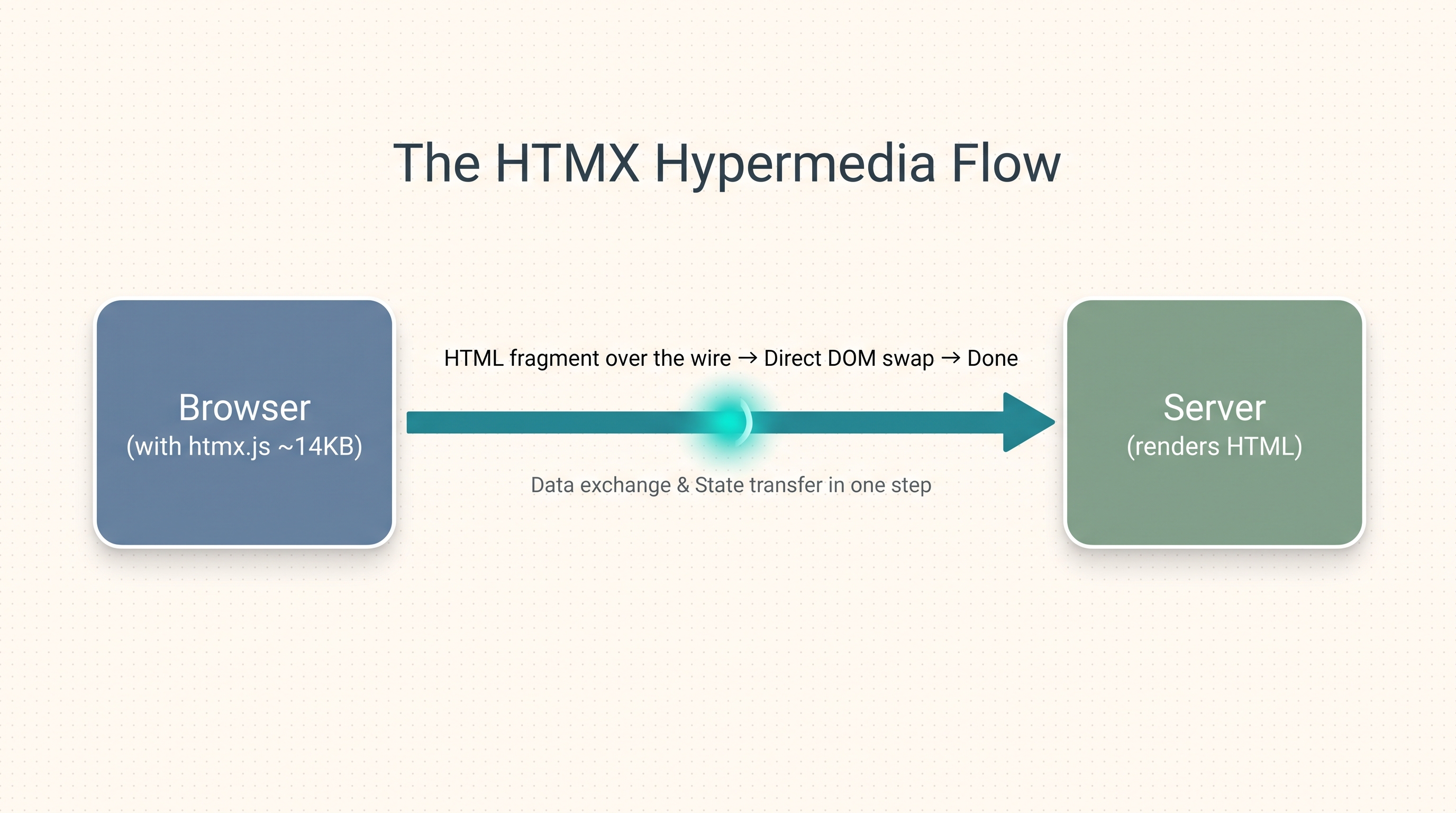
2. The HTMX Hypermedia Flow
In an HTMX hypermedia application, the browser sends a request, the server renders the HTML fragment directly on the backend, sends it over the wire, and HTMX swaps it directly into the DOM. No JSON parsing, client state synchronization, or Virtual DOM diffing required!
Three principles to tattoo on your brain:
- 🧠 The server is the state of record: No Redux, no Pinia, no Zustand. The database and backend session are the single source of truth.
- 🌐 HTML is the wire format: Not JSON, not Protobuf, not GraphQL — HTML over the wire.
- 🖥️ The browser is the rendering engine: Don't try to compete with it or rebuild browser layouts in JS.
This isn't theoretical. It's how Basecamp, GitHub PRs, HEY, Django's admin, and hundreds of modern internal tools work today.
📊 HTMX vs. React vs. Vue: An Honest Comparison
Here is a side-by-side comparison to help you choose the right tool for the job:
| Feature | HTMX 2.x 🚀 | React 18+ ⚛ | Vue 3 🟢 |
|---|---|---|---|
| Architecture | Hypermedia-Driven (HTML over the wire) | Client-Side SPA (JSON APIs + Client Render) | Hybrid (can be SPA, MPA, or simple script) |
| Bundle Size | ~14KB (minified + gzipped) | ~45KB + Router + State (~150KB+) | ~30KB + Router (~90KB+) |
| Learning Curve | Extremely Low (HTML attributes) | Steep (JSX, Hooks, build tools, state) | Moderate (Options/Composition API) |
| State Management | Handled entirely on the Server | Client-Side (Redux, Zustand, Context) | Client-Side (Pinia, Vuex, Ref) |
| Primary Use Case | CRUD apps, Admin panels, Content-heavy sites | Highly dynamic dashboards, Offline-first apps | Single Page Apps, Interactive widgets |
| Development Speed | Incredibly Fast (Single codebase) | Slow (Maintaining separate API & Frontend) | Fast-Moderate |
| Initial Page Load | Instant (Fully Server-Rendered) | Delayed (Requires loading JS bundle) | Delayed (unless using SSR/Nuxt) |
| SEO | Perfect by default | Requires SSR (Next.js, Remix) | Requires SSR (Nuxt) |
| Offline Support | Weak (needs PWA/service-worker) | Strong (IndexedDB, Redux Persist) | Strong |
HTMX is not a replacement for JavaScript. It is a tool to replace unnecessary SPA complexity when standard server-rendered HTML can achieve the same dynamic experience.
💻 Hello World: 3 Backend Stacks
Let's build a "Hello World" interactive button using HTMX. When the user clicks the button, it will fetch a greeting from the server and insert it into a target <div> without reloading the page.
🌐 The Frontend (Common to all Stacks)
Save this file as index.html. It loads HTMX via a CDN (pinning to the recent stable HTMX 2.x series) and uses hx-get to fetch the greeting.
<!DOCTYPE html>
<html lang="en">
<head>
<meta charset="UTF-8">
<meta name="viewport" content="width=device-width, initial-scale=1.0">
<title>HTMX Hello World</title>
<!-- Load HTMX CDN (Version 2.x) -->
integrity="sha384-ujRR8j7O2c5f4YO9854zS5j8O07PW4P9xL5gS6P4z6T1Pf7Q9gYj9X6pJcM3KjUZ"
crossorigin="anonymous"></script>
<style>
body { font-family: sans-serif; padding: 2rem; background-color: #f4f4f9; }
.card { background: white; padding: 2rem; border-radius: 8px; box-shadow: 0 4px 6px rgba(0,0,0,0.1); max-width: 400px; }
button { background: #3b82f6; color: white; border: none; padding: 0.5rem 1rem; border-radius: 4px; cursor: pointer; }
button:hover { background: #2563eb; }
#message { margin-top: 1rem; font-weight: bold; color: #10b981; }
</style>
</head>
<body>
<div class="card">
<h2>HTMX Hello World</h2>
<!--
hx-get: Sends a GET request to the /greet endpoint when clicked
hx-target: Specifies where to swap the returning HTML response
hx-swap: Dictates HOW to swap the response (innerHTML replaces contents inside target)
-->
<button hx-get="/greet" hx-target="#message" hx-swap="innerHTML">
Say Hello 👋
</button>
<div id="message"></div>
</div>
</body>
</html>
:::info "Vocabulary Check" Master these four terms — they form 90% of your HTMX workflow:
hx-target: where the new HTML fragment goes.hx-swap: how it goes in (e.g.innerHTML,outerHTML,afterend).hx-trigger: when the request is made (default:clickfor buttons,submitfor forms).hx-get/hx-post/hx-put/hx-delete: what HTTP request method and URL is called. :::
🟢 Stack 1: Node.js + Express
Create a new directory, run npm init -y and npm install express. Save this file as server.js.
// server.js - Node.js + Express implementation
const express = require('express');
const path = require('path');
const app = express();
const PORT = 3000;

// Serve static HTML page
app.get('/', (req, res) => {
    res.sendFile(path.join(__dirname, 'index.html'));
});

// HTMX Endpoint: Returns raw HTML snippet instead of JSON
app.get('/greet', (req, res) => {
    const today = new Date().toLocaleTimeString();
    res.send(`<span>Hello World! The server time is ${today} 🕒</span>`);
});

app.listen(PORT, () => {
    console.log(`Express server running at http://localhost:${PORT}`);
});
🐍 Stack 2: Python + FastAPI
Install dependencies: pip install fastapi uvicorn. Save this file as main.py.
# main.py - Python + FastAPI implementation
from fastapi import FastAPI
from fastapi.responses import HTMLResponse, FileResponse
from datetime import datetime

app = FastAPI()

# Serve static HTML page
@app.get("/", response_class=FileResponse)
def read_root():
    return "index.html"

# HTMX Endpoint: Returns raw HTML snippet
@app.get("/greet", response_class=HTMLResponse)
def greet():
    current_time = datetime.now().strftime("%H:%M:%S")
    return f"<span>Hello World! The server time is {current_time} 🕒</span>"

if __name__ == "__main__":
    import uvicorn
    uvicorn.run(app, host="127.0.0.1", port=3000)
🐹 Stack 3: Go (Standard Library)
Save this file as main.go. No external dependencies are needed!
// main.go - Go standard library implementation
package main

import (
	"fmt"
	"net/http"
	"time"
)

// Serve static HTML page
func handleIndex(w http.ResponseWriter, r *http.Request) {
	http.ServeFile(w, r, "index.html")
}

// HTMX Endpoint: Returns raw HTML snippet
func handleGreet(w http.ResponseWriter, r *http.Request) {
	currentTime := time.Now().Format("15:04:05")
	w.Header().Set("Content-Type", "text/html")
	fmt.Fprintf(w, "<span>Hello World! The server time is %s 🕒</span>", currentTime)
}

func main() {
	http.HandleFunc("/", handleIndex)
	http.HandleFunc("/greet", handleGreet)

	fmt.Println("Go server running at http://localhost:3000")
	if err := http.ListenAndServe(":3000", nil); err != nil {
		panic(err)
	}
}
❓ Quick Quiz
:::question "How does HTMX update the UI?" What does the server return when HTMX makes a request?
- A JSON payload that the browser parses and renders.
- A raw HTML snippet that HTMX swaps directly into the DOM.
- A Javascript bundle that gets compiled on the fly.
- A CSS stylesheet with new style rules. :::
✅ Summary
In this first part of the HTMX series, you learned:
- ✅ HDD Philosophy: The benefits of sending HTML over the wire instead of JSON.
- ✅ SPA vs. HTMX Flow: Visually mapping how hypermedia elements bypass Virtual DOM diffing.
- ✅ HTMX vs SPAs: How HTMX bypasses Javascript fatigue, bundles, and client state.
- ✅ Multi-Stack Setup: How to render dynamic HTML snippets using Express, FastAPI, and Go.