HTMX Part 4: Decision Tree & AEO/Voice Search FAQ 🌳
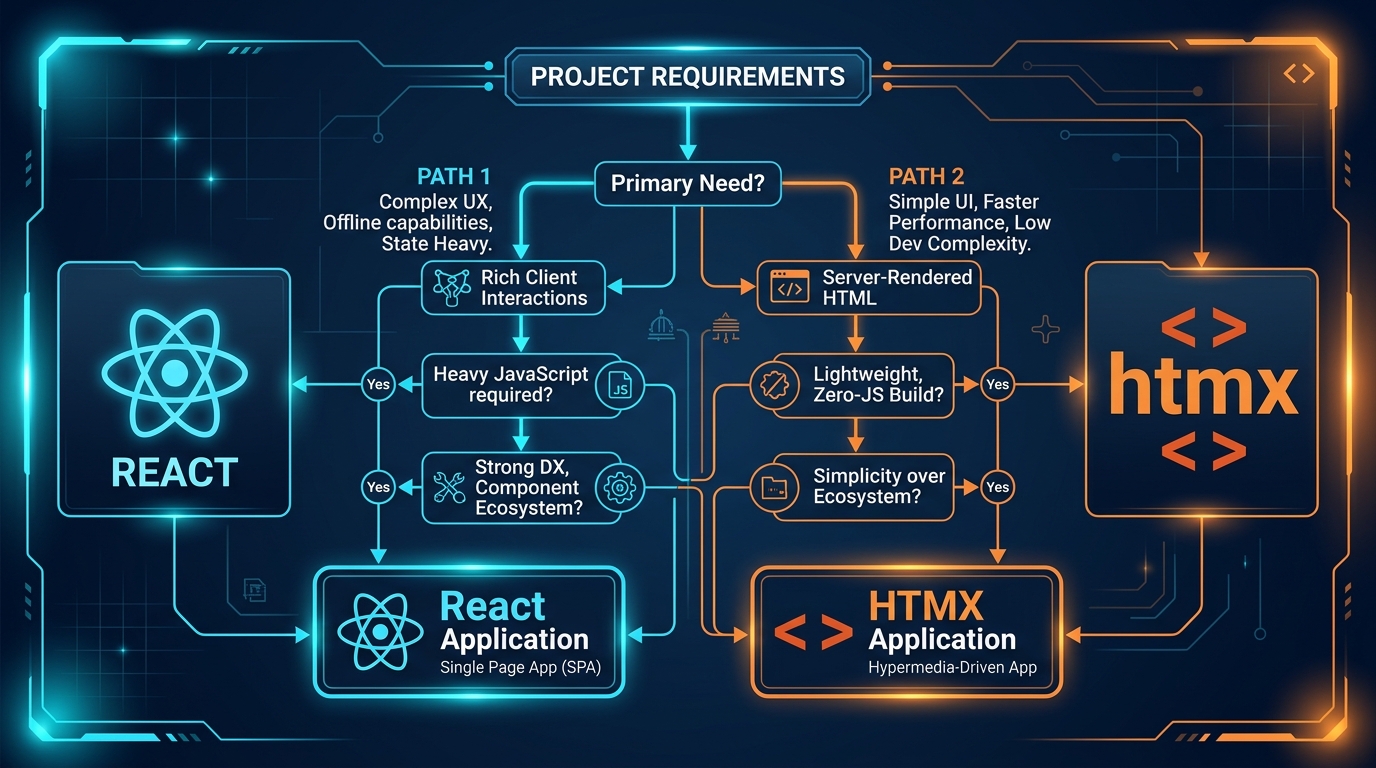
Mentor's Note: Before starting any project, choosing the right tool is the most important decision you can make. Developers often get caught up in hype, choosing React when HTMX would be 10x simpler, or choosing HTMX when React is actually required. In this final part, we provide an architectural decision tree and an optimization-focused FAQ! 💡
🌟 The Scenario: Launching a New Web Portal 🚀
Imagine you are the Lead Architect at a tech startup in Surat. You need to build:
- An Admin Portal for staff to manage database records, run school reports, and update contact forms.
- A Collaborative Diagram Designer (like Figma) where students draw diagrams and collaborate on canvas in real-time.
Should you use HTMX or React for these portals? Let's use our decision tree to decide!
🌳 HTMX vs. React: The Decision Tree
Use this visual guide to choose between HTMX and React for your next project:
Quick Decision Matrix
| Choose HTMX 🚀 if: | Choose React ⚛️ if: |
|---|---|
| Your application is mostly server-rendered CRUD pages, lists, and forms. | You are building an offline-first app that needs client-side storage (IndexedDB). |
| You want to build the entire app using Python, Go, Java, C#, or PHP. | Your page requires highly complex client state (like canvas drawing, dragging, dropping). |
| You want fast initial page load speeds and great SEO out of the box. | You are building a mobile application wrap (e.g. React Native). |
| You want to avoid maintaining a separate API and state store. | You have a large team of frontend-only developers. |
🤝 The Hybrid Approach: React Islands
You do not have to pick one to the exclusion of the other. The hybrid pattern is highly productive: use HTMX for 95% of your standard pages, forms, and tables, and mount a single React component (a "React Island") for specific complex widgets (like an interactive chart or canvas).
This is exactly how GitHub organizes its platform — server-rendered pages for issues and profile grids, and interactive JS overlays for special widgets.
❓ 15-Question FAQ (Tuned for AEO & Voice Search)
Here are the top 15 questions developers ask about HTMX, answered directly and concisely for Answer Engines (like Google Gemini and search snippets).
1. What is HTMX and how does it work?
HTMX is a 14KB JavaScript library that lets you make AJAX requests, trigger CSS transitions, and update any part of your page directly from HTML attributes. It works by intercepting natural browser events (click, submit, keyup), firing asynchronous requests, and swapping the returning HTML fragment directly into the DOM.
2. Does HTMX replace React and Vue?
HTMX replaces React and Vue for content-heavy web applications, CRUD portals, and admin dashboards by shifting HTML rendering back to the server. However, it does not replace them for applications requiring complex offline state, canvas rendering, or games.
3. Is HTMX good for Search Engine Optimization (SEO)?
Yes, HTMX is excellent for SEO. Because HTMX relies on standard server-side rendering (SSR), search engine crawlers receive fully rendered HTML pages on initial load, ensuring optimal indexability without needing complex hydration configurations.
4. Can I use HTMX with any backend language?
Yes, HTMX is completely backend-agnostic. It communicates using standard HTTP requests and responses, meaning you can use it with Node.js, Python, Go, Java, PHP, Ruby, Rust, or any other server-side language.
5. Does HTMX require JavaScript?
HTMX itself is written in JavaScript (~14KB), but developers using HTMX write clean HTML attributes instead of writing custom client-side JavaScript code to handle interactivity.
6. How does HTMX handle CSS styling?
HTMX does not affect CSS styling. It swaps HTML elements into the DOM, which immediately inherit styles from your CSS stylesheets, Tailwind classes, or style frameworks.
7. Is HTMX secure against Cross-Site Scripting (XSS)?
HTMX is as secure as your backend template engine. Since HTMX swaps HTML returned directly from your server, you must ensure your server sanitizes user-generated content, preventing XSS injection.
8. How does HTMX handle client-side form validation?
HTMX respects standard HTML5 validation attributes (like required, pattern, minlength). If validation fails, the browser prevents the HTMX request from being sent.
9. Can I use React and HTMX together in the same project?
Yes, you can run them together. You can use HTMX to manage 95% of your application's pages and embed React components inside specific divs for highly dynamic widgets like interactive maps or charts.
10. Is HTMX suitable for building mobile applications?
HTMX is designed for web browsers. It is not suitable for native iOS or Android apps, though it can run inside hybrid web views (like Capacitor or Cordova).
11. How does HTMX handle real-time updates like WebSockets?
HTMX has native extensions (like ws and sse) that allow elements to establish WebSocket or Server-Sent Events connections and swap incoming payloads directly into the page layout.
12. How does HTMX compare to Hotwire, Turbo, and Alpine.js?
HTMX is similar to Rails Hotwire (Turbo) but is backend-agnostic and easier to drop into any project. Alpine.js is often paired with HTMX to handle small, purely client-side interactions (like toggling a modal drop-down).
13. Does HTMX support offline-first applications?
No, HTMX requires a network connection to communicate with the server to fetch HTML snippets. It is not suitable for applications that must operate entirely offline.
14. What are the main limitations of HTMX?
The main limitations of HTMX are its reliance on an active network connection, lack of client-side offline storage logic, and inefficiency when rendering extremely fast-updating user interfaces like real-time graphic editors.
15. Is HTMX ready for enterprise production applications?
Yes, HTMX is a stable, mature technology used in major production environments. Its simplicity reduces bug surfaces, lowers API maintenance overhead, and speeds up product delivery times.
📚 Where to Go From Here
- Read the Official Essays: Explore Carson Gross's essays at htmx.org/essays, starting with "Hypermedia-Driven Applications".
- Try the Extension Gallery: Take a look at the official extensions at htmx.org/extensions (like
ws,sse, orresponse-targets). - Read "Hypermedia Systems": Read the free online book by Carson Gross, Taylor Town, and John Nagle at hypermedia.systems.
✅ Summary
In this final part of our HTMX series, you learned:
- ✅ Architectural Evaluation: How to analyze project complexity to choose HTMX or React.
- ✅ Deciding Factors: Tradeoffs between backend-driven HTML versus client-side JS bundles.
- ✅ Factual FAQ: Resolving doubts around security, mobile use cases, real-time events, and styling.